2025-11-11 12:31:49.107 defaults[2602:23236] Could not write domain /Users/gary/Library/Containers/com.softpress.Xway/Data/Library/Preferences/com.softpress.Xway; exiting
after trying the 2nd command, this is what I get:
2025-11-11 12:33:40.067 defaults[2609:24418]
The domain/default pair of (/Users/gary/Library/Containers/com.softpress.Xway/Data/Library/Preferences/com.softpress.Xway, SPUploadDisableMLSDForDirectoryListing) does not exist
You can return to the previous version of Xway, but if you have saved your document in 1.1 you won’t be able to open it in 1.0, so you will need to revert to a backup version.
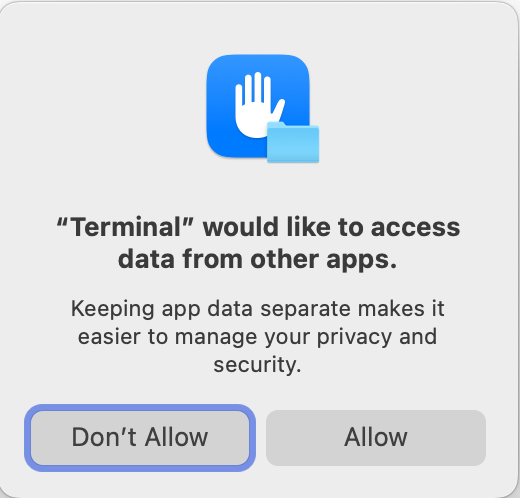
I’ll send you a download link in a minute, but we think you might have clicked on Don’t Allow in the following dialog, which Terminal displays when you set a user preference:
… and click on “Allow”. This is a temporary permission. Terminal will ask again if you quit and restart it. Nothing gets sent to Apple. It simply allows Terminal to set a user default that belongs to Xway (not Terminal).
this is what Terminal says now, after I quit, re-opened, and entered your last command:
Last login: Tue Nov 11 13:09:07 on ttys000
The default interactive shell is now zsh.
To update your account to use zsh, please run chsh -s /bin/zsh.
For more details, please visit Use zsh as the default shell on your Mac - Apple Support .
new-host-2:~ gary$ defaults write com.softpress.Xway SPUploadDisableMLSDForDirectoryListing true
So why are they still asking me to “update your account”? Has entering those commands caused a problem that needs to be corrected?
You don’t need to update your shell. This is something that changed a few years ago (the default shell became zsh instead of chsh). Entering user defaults commands won’t have affected it.
Unless you regularly use Terminal, I don’t think there’s any reason to update to zsh.
my sincere apology: looks like your command solution would have worked from the beginning had I not clicked “Don’t Allow.” So: I just entered your last command, restarted Xway, and VOILA! the upload went through. Like Captain Kirk used to tell Scotty when he saved the Universe from utter destruction: Jeremy, “you just earned your pay for the week!” And it’s only Tuesday. ; ]
No need to apologise. I use Terminal all the time, so I’ve learned to click on Allow automatically for this kind of thing, and I forgot to mention it. I’ve updated my earlier instructions for anyone else who runs into this problem.
I’m glad it’s working now!
We’ll look into why MLSD isn’t working for some servers, and fix it in a future update.
Also, for reference, the download link for Xway 1.0 is: