Hi everyone! OK I’m new here. I last coded websites directly in HTML in text editors 20 years ago. I’m getting back on the horse and fair to say things are very different now - hence I’m trying out Xway to bring my capabilities into the 21st century.
I’m developing a page with clickable buttons and doing that by putting boxes inside a flex container. I note that the outer flex container can have a link associated with it - because the “Link Inspector” option is shown at the top of the right inspector panel (see it circled in red below in the screenshot), and I could link that flex container to something if I wanted to (but I don’t - Link Type is set to None).
What’s got me puzzled though is if I put another box inside the Flex Container, and turn it into a Flex Container by ticking said box under “Style” - it does not have the option to add a link, and I would like to add one. But there’s no Link Inspector available. See screenshot as to the difference.
I have read a number of sections in the Xway manual - it says on p.179 that “Xway does not allow you to attach a link to a box that is a flex item” even though my top-level flex container clearly could have a link added to it if I wanted to add one. So I’m confused.
Asking AI mostly produced slop, so here I am, asking if real humans can help me out . Thanks.
There is a section in the Xway User Guide ( “Flex items and links”) that deals with this. I’ve quoted it below:
“Xway does not allow you to attach a link to a box that is a flex item. This is because flex items are children of a flex container, but an attached link inserts a link between a box and its container (a box that has an attached link is a grandchild of its container). You can work around this by wrapping another box around the box that you wish to add a link to: use cut and paste to insert the box into a new parent that will be the flex item, and then set a link on the child box. If the child box is an image, you could also set it to have 100% width so that it expands to the width of its parent.”
If you attach a link to a box, the link becomes the parent of that box, so (if Xway allowed you to do this) the box would no longer be the child of the flex container: as far as HTML is concerned, it is now a grandchild of the container. Instead of having a container box with a child box, you now have a container box with a child link, and the box that the link is wrapped around is a child of the link (and a grandchild of the container box).
The structure is: container box > link > box
To avoid this issue, you can insert a wrapper box that doesn’t contain a link, and put the box with the attached (i.e. parent) link within this wrapper box, creating the following structure:
flex-container > wrapper box (flex item) > link > box
OK, I’m still struggling so maybe I’m a hopeless cause…
Regarding “Xway does not allow you to attach a link to a box that is a flex item” my thinking was the inner box is no longer a “flex item” because I checked the box called “flex container” (see earlier screenshot) . Is that not correct?
So to me it looked like there was an inconsistency - the outer flex container could have a link attached without apparently causing any issues. But the inner flex container could not, despite having the “flex container” checkbox ticked to turn the box into one.
my thinking was the inner box is no longer a “flex item” because I checked the box called “flex container”
A box can be both a flex item and a flex container.
Here’s another section from the Flex Layout chapter in the Xway User Guide:
“When a box is converted into a flex container, Xway displays a Flex Container section immediately below the Style section. Any boxes that are (immediate) children of this container automatically become flex items, so Xway displays a Flex Item section when they are selected. It’s also possible for a flex item to be a flex container for other flex items.”
You can’t apply links to flex items (because if you did that they would no longer be flex items) but there is nothing to prevent you from applying them to flex containers that are not also flex items.
Another thing to remember is that HTML does not allow links to be nested: if you apply a link to a box, you will not be able to apply a link to any box or text that is within that box. So, although Xway does not prevent you from applying a link to a flex container (there might be some situation where this is useful), you mostly wouldn’t want to do this. Typically, you apply links to text or to boxes that are intended to behave as buttons.
 . Thanks.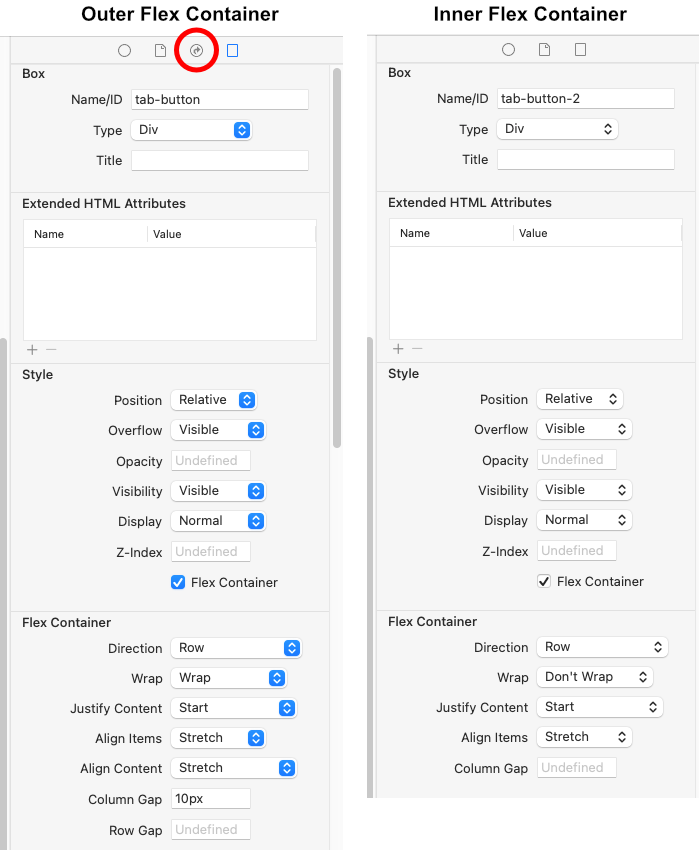
 . Is that not correct?