Only thing I can’t figure out is how to embed that into a FW file
freewaytalk mailing list
email@hidden
Update your subscriptions at:
http://freewaytalk.net/person/options
Only thing I can’t figure out is how to embed that into a FW file
freewaytalk mailing list
email@hidden
Update your subscriptions at:
http://freewaytalk.net/person/options
Ok so it’s working now!
http://hgrantdesigns.com/test/
How can i get it centered?
freewaytalk mailing list
email@hidden
Update your subscriptions at:
http://freewaytalk.net/person/options
Here’s a simple example; https://dl.dropboxusercontent.com/u/795566/test/Responsive%20Galleria%20test/index.html
Tim - that gives me some js errors in Chrome 33 and doesn’t work.
[blocked] The page at 'https://dl.dropboxusercontent.com/u/795566/test/Responsive%20Galleria%20test/index.html' was loaded over HTTPS, but ran insecure content from 'http://ajax.googleapis.com/ajax/libs/jquery/1.7.1/jquery.min.js': this content should also be loaded over HTTPS.
 index.html:1
Uncaught ReferenceError: jQuery is not defined galleria-1.2.8.min.js:9
Uncaught ReferenceError: Galleria is not defined
Looks great in Safari though.
David
freewaytalk mailing list
email@hidden
Update your subscriptions at:
http://freewaytalk.net/person/options
Ok so now i can’t seem to get it under the css menu, any ideas?
freewaytalk mailing list
email@hidden
Update your subscriptions at:
http://freewaytalk.net/person/options
You have added the code in the wrong place
Insert>Markup Item
D
freewaytalk mailing list
email@hidden
Update your subscriptions at:
http://freewaytalk.net/person/options
Oh really? I thought it had to be in the html area, whoops!
freewaytalk mailing list
email@hidden
Update your subscriptions at:
http://freewaytalk.net/person/options
Working great now! Thanks everyone
freewaytalk mailing list
email@hidden
Update your subscriptions at:
http://freewaytalk.net/person/options
How can i get it centered now? any ideas
freewaytalk mailing list
email@hidden
Update your subscriptions at:
http://freewaytalk.net/person/options
Hi Dave,
Sorry about that. I forgot that Dropbox hosts on a secure server. That demo should be fine now;
https://dl.dropboxusercontent.com/u/795566/test/Responsive%20Galleria%20test/index.html
Regards,
Tim.
On 26 Oct 2014, at 21:33, DeltaDave wrote:
Tim - that gives me some js errors in Chrome 33 and doesn’t work.
Experienced Freeway designer for hire - http://www.freewayactions.com
freewaytalk mailing list
email@hidden
Update your subscriptions at:
http://freewaytalk.net/person/options
That demo should be fine now
Yep - looks good.
And you should definitely add it to your paid actions.
D
freewaytalk mailing list
email@hidden
Update your subscriptions at:
http://freewaytalk.net/person/options
On 26 Oct 2014, 8:25 pm, waltd wrote:
Tim, what is that camera? It looks a whole lot like one Ive had on my shelf for years, except mine isnt a rangefinder.
Walter
freewaytalk mailing list
email@hidden
Update your subscriptions at:
http://freewaytalk.net/person/options
On 26 Oct 2014, 9:04 pm, Karen E wrote:
This one looks good too - http://www.juicebox.net
It even has a little program that does all the work for you. The free version to test - then $45 for Pro if you want to remove the branding.
My site is currently using the Pro version of Juicebox. I’d like to switch to Exhibeo, for simplicity, but the lack of support for icc profiles and metadata is a hindrance (also, in tests, I’ve failed to get it to resize responsively too.)
Here’s my juicebox site (grantsymon.com)
If you visit on an iPad, iPhone and a desktop you will see a different layout, which is nice. You may also notice that it’s buggy and needs reloading on iPad when you switch layouts. Sigh.
Thomas (I think) made a comment that it’s bad practice to use an iFrame, but it certainly makes it simple. There is an action which you just draw on your page, choose the location of your site (which you’ve ftp’d to your server) and you’re good to go.
freewaytalk mailing list
email@hidden
Update your subscriptions at:
http://freewaytalk.net/person/options
Yeah, I am going to use the lite version for now. I like the way it is setup too
freewaytalk mailing list
email@hidden
Update your subscriptions at:
http://freewaytalk.net/person/options
Glad it worked for you Howard!
There just aren’t really many simple responsive slideshow/gallery options for Freeway without getting into coding. As mentioned earlier http://galleria.io/docs/getting_started/beginners_guide/ is responsive (and free for the one theme) but wedging it into a FW site is another matter.
galleria.io seems to want to be installed in pieces in different parts of the code - I’m just not sure/experienced with this to figure it out - let alone be able to control the finished layout & alignments etc. Tim’s proposed Action based on this would be welcome - hopefully there are enough customization parameters. 
I managed to get Walter’s code example above working in FW by copying everything after and then going to Page/HTML Markup/After , and pasting it in. Crude but it worked. Add some size/spacing/framing options/elements and a timer and you’re good to go.
Wouldn’t it be wonderful if Softpress resurrected Showcase and made it responsive?
freewaytalk mailing list
email@hidden
Update your subscriptions at:
http://freewaytalk.net/person/options
Totally would be, but we shall see if that happens!
freewaytalk mailing list
email@hidden
Update your subscriptions at:
http://freewaytalk.net/person/options
I made a more heavily commented version of my Gist here:
This explains what each line of JavaScript does. Note that to use this trick, you need to get really large images into your thumbnail area, but then use CSS to scale them down to become the thumbnails. You could either do this with an inline layout in Freeway, or maybe an Action to get the full-size image and replace the thumbnails with the real image.
Walter
freewaytalk mailing list
email@hidden
Update your subscriptions at:
http://freewaytalk.net/person/options
I’ve done this for other things too, and had good results. Note that some performance testing sites like GTMetrix (and possibly Google, I’m not sure) will hit you for scaling images with CSS. Though how much it really affects performance is debatable, but I thought it was worth mentioning in case anyone cares about such things.
Todd
Note that to use this trick, you need to get really large images into your thumbnail area, but then use CSS to scale them down to become the thumbnails.
freewaytalk mailing list
email@hidden
Update your subscriptions at:
http://freewaytalk.net/person/options
Sorry, Dave, not even close. A Guide to Russian & Soviet / Former Soviet Cameras | Envato Tuts+
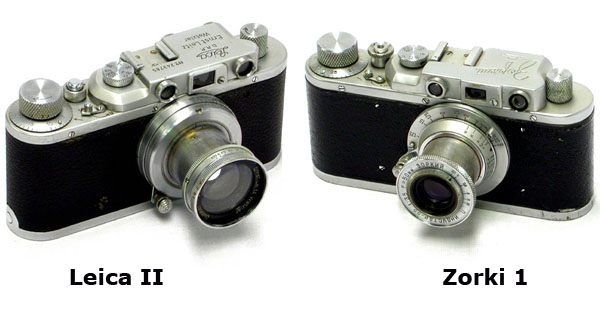
Walter
On Oct 27, 2014, at 8:49 AM, DeltaDave email@hidden wrote:
On 26 Oct 2014, 8:25 pm, waltd wrote:
Tim, what is that camera? It looks a whole lot like one Ive had on my shelf for years, except mine isnt a rangefinder.
Walter
freewaytalk mailing list
email@hidden
Update your subscriptions at:
http://freewaytalk.net/person/options
freewaytalk mailing list
email@hidden
Update your subscriptions at:
http://freewaytalk.net/person/options
Thats not the pic I saw in Tim’s Gallery!
Or was I looking in the wrong place?
D
freewaytalk mailing list
email@hidden
Update your subscriptions at:
http://freewaytalk.net/person/options
That’s the camera I see on galleria.io, front and center.
Walter
On Oct 27, 2014, at 9:42 PM, DeltaDave email@hidden wrote:
Thats not the pic I saw in Tim’s Gallery!
Or was I looking in the wrong place?
D
freewaytalk mailing list
email@hidden
Update your subscriptions at:
http://freewaytalk.net/person/options
freewaytalk mailing list
email@hidden
Update your subscriptions at:
http://freewaytalk.net/person/options