Recently purchased a copy of Freeway Pro … really am completely stumped on one thing, if anyone out there could help would be great!
Got some html text on a page, got a word I would like to set as a link to another page.
Would like the word to change from from white to off-white when hovering.
Have set this up in the inspector, and my word will indeed change to off-white, or any other colour I may choose when ‘hovering’ so that seems to be all good.
But …
In the ‘normal’ state, any word I set as a hyperlink always comes out purple. Why, pray, on earth is this happening?!
Changing the ‘normal’ colour to any other colour will have no effect: the linked words will always be purple in the ‘normal’ state.
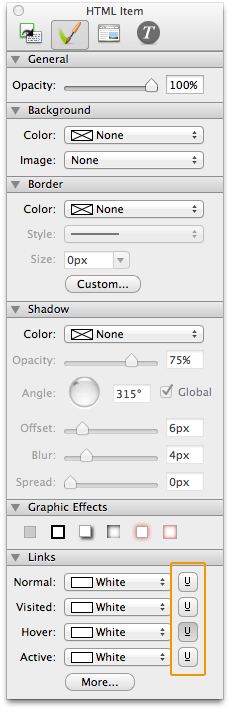
Try clicking the little U button to the right of the colour selection for Normal (Click button until it is white then click twice after that), see if that makes a difference.
HTH
On Apr 15, 2013, at 12:33 PM, Matt wrote:
Hi out there,
Recently purchased a copy of Freeway Pro … really am completely stumped on one thing, if anyone out there could help would be great!
Got some html text on a page, got a word I would like to set as a link to another page.
Would like the word to change from from white to off-white when hovering.
Have set this up in the inspector, and my word will indeed change to off-white, or any other colour I may choose when ‘hovering’ so that seems to be all good.
But …
In the ‘normal’ state, any word I set as a hyperlink always comes out purple. Why, pray, on earth is this happening?!
Changing the ‘normal’ colour to any other colour will have no effect: the linked words will always be purple in the ‘normal’ state.
Hi Mike, thanks for the quick reply and suggestion. Unfortunately that didn’t seem to work … it’s like the whole colour selection option there is not working.
Try ‘Force Republish’ then if that doesn’t work delete the files from the site folder on your computer then select tp upload the site again, this will publish all the pages again then upload them all.
HTH
On Apr 15, 2013, at 12:45 PM, Matt wrote:
Hi Mike, thanks for the quick reply and suggestion. Unfortunately that didn’t seem to work … it’s like the whole colour selection option there is not working.
Hi Mike, yes deleting the files seemed to work … I sent the whole site folder to the trash and resaved my site under a different name and now the colour selection seems to be working … must have been some corruption in there … thanks ever so much for the suggestion … now work can continue!
Remember that purple is the standard visited link browser colour - so if you have been on that page before that is what you will see unless you change the visited colour to something else.
DeltaDave … I did not know that … now it all makes sense! After I deleted my site folder (as mentioned above) I was finally able to set the ‘normal’ colour with some consistency, but … the links started going purple again, but randomly it seemed … I thought surely this is some kind of bug … so now I have changed the colour of the visited links and it is ‘behaving’ itself … thank you very much for that bit of very important info!
Hi, new to Freeway, how do you changed the visited colour? I cannot seem to find visited anywhere and I still have the horrible purple.
On 15 Apr 2013, 4:28 pm, DeltaDave wrote:
Remember that purple is the standard visited link browser colour - so if you have been on that page before that is what you will see unless you change the visited colour to something else.
select the html-box you’re working with, see in inspector the 2. “grafic”-tab (i don’t know the correct name), go down there to the point “links” and make your color settings. Then in your html box select the word you will use as a link, select in the color palette the color “none”. thats it. you’ll see the result after you’ve made the link to the other page ready.
sry for bad english, Tom
It’s in the same dialogue box as Thomas has pointed you to. Just click the ‘U’ button until it goes - the change in colours is very subtle (they need to make it more distinct in the upgrade - preferably blue or purple to reflect that the underline is on and white to show that it’s off) but it’s one of the three button states.
Trev
On 12 Sep 2013, at 07:49, Terry Lane wrote:
Thanks Thomas, very helpful…Anyone know how to get rid of the underline on a hyperlink. Then I am finished
Do you mean it’s just not there or looks greyed out? If it’s not there then I’m at a loss. If it looks greyed out (as it often does) then click it - there’s a very subtle change in the grey graduation behind the letter.
Failing this - not a clue!
Trev
On 12 Sep 2013, at 08:02, Terry Lane wrote:
Thanks Trevreav but the U button is not available there. I have managed to change the colours but the U defeats me