This was a quick simple wee job that seems to have become a bit bugged.
Instead of using the export to Freeway, I tried the export to html so that I could load the resultant directory straight to the server and thus have an accessible gallery without the need to embed a page in a website.
The images aren’t loading even after I have reduced the size; tried other themes with various settings. The latest version uses the Photoswipe theme in Exhibeo 2
Its not a browser issue as I’ve tested it in numerous.
Its Exhibeo2 I have used though have actually gone back to try Exhibeo as the themes don’t appear to crop images when viewed.
Hope that this makes sense.
Many thanks for any helpful suggestions or insights.
This looks like an upload problem. Have you uploaded the css, image, js, and theme folders that Exhibeo exported, and everything in them? The images don’t appear to have been uploaded.
Its Exhibeo2 I have used though have actually gone back to try Exhibeo as the themes don’t appear to crop images when viewed.
Images need to be cropped for some themes, but if you change to a theme where images don’t need to be cropped, you can reset the cropping by choosing Reset Thumbnail Transformations and Reset Image Transformations from the Image menu. Select all the images (choose Select All from the Edit menu) if you wish to do this for every image.
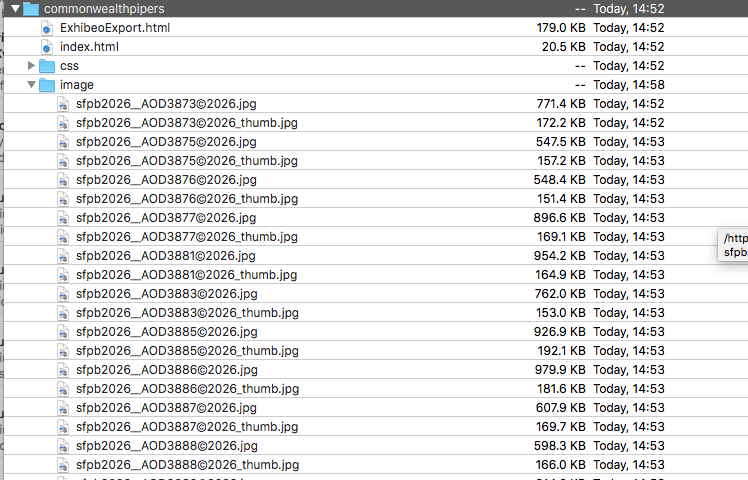
I uploaded the whole directory with images etc via Cyberduck to the root folder of the site. The images are in the ‘images’ folder within the uploaded directory.
My thinking is that its the address or linkage for the images may have been broken at some point in the process. I hadn’t anticipated that this would occur as it all seemed so straightforward!
Thanks for the tip re the thumbnail transformations reset. I shall have a look at that now.
I am currently uploading the same images to a html page created in Freeway so will see how that works…
Thanks again an as ever am so grateful for your interventions.
I attach a screenshot of the directory viewed in Cyberduck if this shows the structure. This is as exported from Exhibeo 2.
I tried another theme having reset the images and thumbnails as you mentioned, which worked and resolved the issues there so thanks for that. Still the same missing images though.
We think this could be a server encoding issue. E.g. the URL has a UTF-8 character, but the server has it stored on disk as UTF-16. Removing the copyright symbol (or replacing it with “(c)”) may be the way to go.
The curious thing is that all the galleries I upload, over many years, have the copyright symbol in the name as I export the images from my image management software. This is the first time that this has been an issue. It is the first time that I have admittedly uploaded them to a directory without the gallery being added and displayed on a page in a site. Would there therefore be a possible explanation in that change that could explain why its not emerged as an issue before? The way Freeway encodes and/or the way that the server reads the Exhibeo 2 output?
Its taken a long day of frustration to get to this point so I am mighty relieved to be able to sleep knowing that its resolved so thanks again Jeremy and whoever else collaborated on this.
Can you share a link to another gallery that is working and contains images with copyright symbols?
Xway strips out non-ascii symbols from resource names, to avoid these kinds of problems. I think Freeway might do the same, at least in some situations, but I could be wrong.
This was done in Freeway with an Exhibeo 2 Gallery.
Theres a fair few of them as its been in my workflow for a long number of years. I have a couple of sites that are the same but are in need of a bit of a makeover which I’ve stalled on due to the number of pages needing redone!!
Thats interesting. Never realised that was happening.
Lesson learned. Thanks for the insight.
Can you advise if the way I have installed the exhibeo gallery should work in mobile screen sizes? I have found that for many users trying to view the particular page on their mobile phones that the images don’t load. The stack appears but then the images don’t appear when the stack image is clicked. The behaviour is different on iPhones than Android. Loading in the browser when the link is clicked producing inconsistent results. Android shows the thumbnails when the stack image is clicked but then when the thumbnails are clicked the screen stays blank. In iPhone the thumbnails don’t appear at all.
I have stripped out any characters from the file names that may cause issues.
In terms of sizing and how it displays, all themes should react and be displayed based on the size of the browser window, including at mobile size, with the exception of Impress with a minimum width which doesn’t work well in portrait on mobiles.
With regard to the issue of images loading, if they load in one browser whether on desktop or mobile, they should load in all. Depending on your hosting provider and the file size of your images, a few possibilities come to mind:
If the files are very large and the mobile is not on a fast connection, they may just be taking a very long time to load
If they have been viewed previously, some or all of these devices may be caching previous versions of the pages
If these devices are in different parts of the country/world (or appear to be to the host), your hosting provider may be using regional distribution and it may not have fully propagated when you were testing
For the first possibility, you may wish to reduce the resolution or increase compression for the images used in your galleries. This may impact image quality but it’s often possible to significantly reduce file size without much negative impact on viewing experience.
For the second, you can try manually refreshing or explicitly emptying the browser’s cache, how exactly you will need to go about clearing cache will depend on the particular browser used. For Safari on iOS, this explains how: Delete your Safari history, cache, and cookies on iPhone - Apple Support (Scroll down to “Clear cookies and cache, but keep your history”. Note that this will log you out of websites.)
For the third possibility, all you can really do is wait, though you could contact your hosting provider to find out.
The biggest image in the Blox set up is 280Kb and sized at 2048 x 1360 pixels. Thats not too big is it?
I assumed that the images would scale to the window they were being viewed in? Or even show a portion of the images.They look and work fine on desktop and in all browsers on desktop.
Bare in mind that this is an Exhibeo gallery which I assumed would do any scaling necessary for it to be responsive?
The thumbnails are loading in an Android mobile but then doesn’t show the image when thumbnails are clicked.
In the iPhone then the thumbnails don’t show at all.
On some of the devices that can’t see anything then they are the first users of the link and cannot see the images.
I have purged the caches on all browsers.
I should add again that usually this is not an issue when the Exhibeo gallery is embedded in a page in a site. I am assessing if its doable to load the exported html Exhibeo gallery to a directory on the site server to see if it functions as it should in this context.
Thanks for your suggestions. And also for taking the time to engage.
Just another issue regards the Exhibeo export.
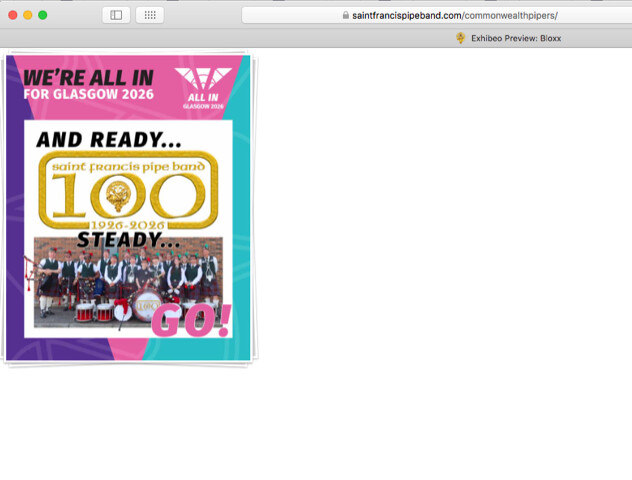
I note that the header in the browser tab shows the name of the page as ‘Exhibeo Preview Bloxx’ See in the image.
How does one edit the header of the Exhibeo gallery to reflect the actual page name? Can’t see a way in Exhibeo itself.
Again is this something that Freeway would strip out or amend within an export were the gallery in a freeway site rather than just an Exhibeo gallery in its own directory?
The file size I talked about in relation to potentially slow loading is separate of the dimensions of the image and things like responsiveness with browser sizing. 280KB is the file size which should indeed be perfectly fine, I wouldn’t expect files of around that size to be a problem for most internet connections, mobile or not.
The preview which comes with the “Export to HTML” is intended to demonstrate the gallery working, rather than to be used directly, though this is not related to the problem you’re seeing.
You can use the preview directly but if used within an iframe you will lose the responsiveness and if simply linked to, the page will open without any header, menus or other elements of your website included. The other HTML file (ExhibeoExport.html) included with the export has instructions for how to include the code within a website, which is how Export to HTML is intended to be used.
For the page title, you can edit index.html in TextEdit. Find <title>Exhibeo Preview: Bloxx</title> and replace “Exhibeo Preview: Bloxx” with whatever page title you wish to use.
I’ve confirmed that I can see the problem of images not loading on iOS, though I haven’t figured out why yet. The images are loading but they are being displayed off the bottom of the screen and scrolling is being prevented.
I do not see the same thing happening on the Softpress website, using Export to Xway, which makes me think it might be related to a CSS problem which was fixed for Export to Xway (and worked around in the Freeway Action) but did not make it into Export to HTML.
I’ll continue looking at this to try to figure out exactly what the problem is and what the fix for it is.
I assumed that the ‘Export to HTML’ was a means to getting the bare bones to be used wherever you can i.e. in its own directory. It certainly does function well enough other than in iOs where there is the issue I have encountered, which you can see also.
I did use the Exhibeo in a site page and it works as it should in all devices and browsers I have set it up in.:
That site is in need of a major overhaul. Its got 175 pages with a load of images and links. When uploading the smallest change then the upload via Freeway never completes as it seems to want to upload almost everything again rather than just the changes, leading to a time out disconnection from the sever. I have reverted to uploading via FTP software to get round that.
However I had hoped that just dropping the exported html to a directory would be a quicker and more succinct method of delivering galleries to users.
Thanks re the naming of the Page title. Sorted that.
If you find anything re the loading of the images then it would be great to hear.